
A Guide To The Best Keyboard Switches
Best keyboard switches – What is the right keyboard for you?

Before buying a keyboard, it’s incredibly helpful to understand the difference between the various keyboard switches and mechanisms available, how they function, and what this means from a practical point of view. The following guide explains the different types of keyboard switches and the core principles involved.
This guide may also provide more background information if you are in the market for gaming keyboards, typing keyboards, or tablet keyboards. Depending on the use case, the type of keyboard switches can impact your typing or gaming experience greatly.
The problem with too much choice…
20 years ago, most people just accepted whatever came with the computer they’d just purchased. To be fair – apart from the fact that peripherals now look a million times better than they did in those days – the core functionality hasn’t really changed. What has changed, is the way in which that functionality is being executed… and boy does this make a difference.
But before we can even begin to benefit from this difference, we need to know what we’re looking at. This is because today’s keyboard technology is so mature, and the market is so broad, that most of us find ourselves in a fairly advanced state of choice paralysis when it comes to deciding what type of keyboard will best suit our needs.
Somewhat mercifully – there are still very few keyboard switches to consider. In fact, there are only two basic categories of keyboards, and only one of them has multiple keyboard switch types.
1. Membrane Keyboard Switches

Membrane keyboards have been the industry standard since the 1980s. Interestingly, ‘mechanical’ keyboards, which are typically more popular among keyboard enthusiasts, date back to the 1970s when keyboards were nothing more than advanced typewriters. But more on those later.
Membrane keyboards became ubiquitous in the world of personal computing, not because the technology was better, but because it was far cheaper to produce at scale.
In a membrane keyboard, the keys lie on a multilayered, pressure-sensitive, rubber membrane that sits over a circuit. When you press a key, the circuit registers the information before sending it to the CPU. It’s less expensive to make because the actual keys don’t require any specifically complex mechanisms, other than a very basic anchor to the membrane. All the heavy lifting is done by the underlying circuit.
Mechanical boards have an independent keyboard switch mechanism for every single key. Every keystroke is registered directly, without first being routed through another sub-system. This makes them faster and more durable, but typically, a lot more expensive.
Traditionally, boards with membrane keyboard switches used rubber domes that housed the keys above the relevant contact points on the circuit board. These domes looked very like the rubber part on a plunger (you know… the type used to clean toilets).
Those of you who’ve ever used a plunger will understand the two main problems with this sort of setup. Firstly, when you press it down, the top doesn’t always touch the surface underneath the dome, and secondly, it can wobble on the way down. So if you remember using keyboards with keys that felt wobbly and unresponsive, this is why.
Shamefully, many cheap keyboards still use this tech, and it’s rubbish – that’s why you need to concentrate when buying a board using membrane keyboard switches.
Why not just pay a bit more and get a board with mechanical switches?
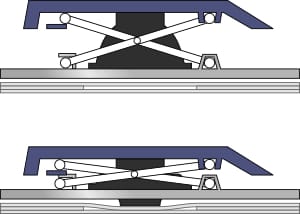
Because the underlying technology isn’t bad. The problem was never anything other than the foolish design of the dome. Fortunately, this was addressed with the advent of the scissor-switch mechanism which is now the industry standard for expensive membrane keyboards.
This thing – which looks like two pairs of scissors with blades at both ends, instead of handles – sits over the dome like a piece of scaffolding. It gives the switch stability all the way down the travel. It also removes the necessity for the dome to have the sort of rigidity that would make it difficult to bottom out. Boards with membrane keyboard switches require the key to bottom out in order to register the keystroke, so there needs to be as little resistance as possible where the rubber meets the road.
I’m busy using scissor-switch keys as I type this article on my MacBook, and it’s a wonderful experience. Most writers, and other people who type for many hours a day, will tell you that scissor-switch membrane keyboards are the best for typing. They have an ultra low-profile, so there’s very little travel, and in practical terms, this simply means that you have to do less work in order to get the keystroke to register.
Whilst it’s technically true that membrane keyboards are less durable than their mechanical counterparts, I’m sure that most typists will agree that the tradeoff is worth it. Typing with scissor switches is an absolute pleasure, and it’s not as if they don’t last for at least a few years of hard work.
In the dark days, the only reason to buy a membrane keyboard was to save money – nowadays, a top of the range one is around the same price as a middle of the range mechanical keyboard… and for good reason.
Mechanical Keyboard Switches

So why are keyboards with mechanical switches still so popular?
Speed
If we’re being persnickety, we have to concede that the circuit adds a layer of interference between cause and effect, because the keystrokes we make don’t go straight to the CPU. Apparently, this causes a delay that gamers can’t countenance.
But this complaint is relatively ridiculous for most of us, because we’re talking about milliseconds here. That said, membrane keyboards do have some drawbacks for the gaming fraternity – it just has far more to do with the way in which the key interacts with its underlying architecture.
Rollover
Many gamers like ’N-key rollover’. This is the ability of the keyboard to register the input of multiple keys at the same time, without the output being blocked. Most membrane keyboards can’t handle multiple keys being pressed at the same time, and ‘ghosting’ occurs. This means that not all of the keystrokes are registered.
In typing terms, this is obviously irrelevant, but depending what games you play, it can be highly relevant to a gamer. Nearly all mechanical keyboards have at least some rollover, and many now have an unlimited capability. This is a bit funny considering most people only have ten fingers… but I’m all for overkill.
Actuation Characteristics
Perhaps the most important issue when looking at mechanical keys though, is actuation. The actuation point is simply the point in the travel of the key at which it registers as a keystroke. On a membrane board, this is at the end of the travel, so having a short travel distance is the key to saving effort and making typing seamless.
On a mechanical board, the actuation point varies, depending on your preference. This is good for gaming because different play styles often require different key switch setups for optimal performance and enjoyment.
Broadly speaking, there are three defining switch characteristics and five traditional types of mechanical keyboard switches. The easiest way to explain them is using the standards set up by the German keyboard switch making company, Cherry GmbH.
They created ‘Mechanical X-point’ switches in the early 1980s (known simply as ‘Cherry MX’) that became the standard by which all mechanical switches came to be defined. There have been many switch making companies over the years, but nearly all of them have cloned the Cherry MX standards.
The three main switch characteristics are: Linear, Tactile and Clicky, and the main keyboard switch types that employ these characteristics are Cherry MX Black, Red, Brown, Blue and Speed.
Although most switch manufacturers simply clone these colors and their defining characteristics, some do offer different ones with different colors, but their characteristics generally map on to a corresponding Cherry MX color.
If you play First Person Shooters (FPS), you’ll invariably want Linear switches; if you play Real Time Strategy (RTS) or Multiplayer Online Battle Arena (MOBA) games, you’ll invariably want Clicky or Tactile keyboard switches.
If you want to type on a mechanical keyboard, you’ll also want Clicky or Tactile keyboard switches, and most typists go for Tactile ones, because the noise of Clicky ones becomes very distracting and even irritating after a while.
So where does the difference come in? Feedback!
Linear Keyboard Switches
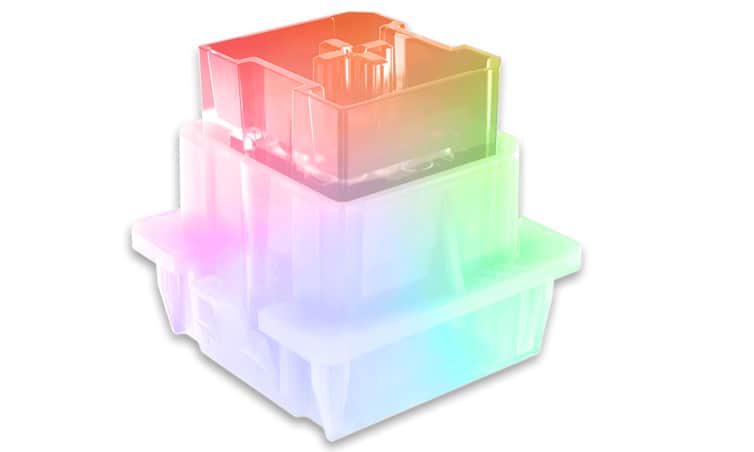
Cherry MX Black and Red keys are Linear. The only difference between these keyboard switch types is that the Red has a lighter actuation force, and the Black a heavier one.
Linear keyboard switches travel up and down silently, without resistance at the actuation point, which typically sits in the middle of the travel of the key. Some switch brands differ slightly, the Cherry MX standard is 4mm travel and the actuation point sits at 2mm.
This is actually the same for all of their keyboard switches, except for their ‘low profile’ keyboard switches (mainly gaming laptops), and the aptly named MX Speed, which has a 1.2mm actuation point. The low profile MX Speed switch takes it all the way up to 1mm.
Lack of resistance at the actuation point is good for speed of depression, and even though most Linear switch users ‘bottom out’ their keys when playing games, it’s important to them that the actuation happens before the bottoming out occurs.
This style of keyboard switch suits the FPS player because their games don’t require as many actions per minute as MOBA or RTS games – they require super fast actions as and when they need to occur, and they don’t need any feedback, because they typically bottom out the key before moving on to another.
Clicky and Tactile Keyboard Switches

Clicky and tactile keyboard switches both give you feedback at the actuation point. This helps with achieving high APM (actions per minute), because it enhances the speed at which you’re comfortable with moving on to the next key. This is important in RTS and MOBA games, because of the primacy of APM.
Tactile keyboard switches, like the Cherry MX Brown, have resistance at the actuation point, so that you can feel when you’ve reached it, and move on before bottoming the key out. This suits most RTS and MOBA players, but some like to hear the actuation point too (as an added bit of feedback), so these players will opt for Cherry MX Blue keys. In fact, the MX Blues tend to give more of both types of feedback at the actuation point.
So is that then the end of the story? No.
Optical, Optical Analog & Magnetic Keyboard Switches

In the last few years, the big gaming keyboard manufacturers have upped the ante somewhat, with the development of ‘Optical’ mechanical keyboard switches. In fact, some manufacturers have taken the technology even further to develop ‘ Optical Analog’ and ‘Magnetic’ mechanical keyboard switches.
Optical Mechanical Keyboard Switches
Normal mechanical keyboard switches make contact with a metal surface at the actuation point in order to break a circuit and send the relevant input to the computer. They’re finely tuned and the contact is relatively minor, so it doesn’t really have a deleterious effect on speed.
The durability of the mechanisms is also legendary. Most mechanical keyboard switches can claim a 50 million click lifespan with equanimity, whilst membrane keyboards can dream on. But what if no contact was ever made?
Enter Optical mechanical keyboard switches. These things are still mechanical, in the sense that there’s a mechanism in play that resembles the traditional kind in every respect, but instead of physical metal-to-metal contact at the actuation point, the switch simply breaks a beam of light in order to interrupt the relevant circuit.
So what does this really mean in practical terms?
Primarily… speed. In fact, so much speed that it’s difficult to contemplate how even a top professional gamer could take full advantage of it. Durability is also important. Because no contact is ever made with a physical surface in order to actuate, the lifespan is double that of the already ridiculously durable standard mechanical keyboard switches.
But perhaps the most interesting thing about Optical keyboard switch technology is the fact that it opens the door for certain basic characteristics to be manipulated in ways that were previously impossible.
Optical Analog and Magnetic Keyboard Switches
This is where Optical Analog keyboard switches come in. The defining characteristic of these keyboard switches is that they allow the user to not only set their own actuation point, (in some cases, much higher than previously possible), but to set the keyboard switch mechanism up in such a way as to actuate a function with variable intensity.
For example, if you’re using a keyboard for movement in a game, you can speed up that movement or slow it down, depending on how hard you depress the key. It is like a joystick – something which keyboards have never been able to replicate… until now.
On the Razer Huntsman V2 Analog, you can even set dual actuation points. They give the example of being able to equip a weapon as you reach the first point of actuation in your keystroke, and then fire it as you follow through.
Steelseries have done something similar with the OmniPoint keyboard switches in their flagship Apex Pro keyboard. These use magnets instead of light beams but for almost identical purposes.
Although they don’t currently have dual actuation like the Razer, you can set the actuation point within a range that isn’t offered by the Razer. You can set it anywhere between 0.4 and 4mm. I honestly believe that if you were to go higher than this (as you can on the Wooting 2 HE keyboard), you’d be able to actuate by blowing on the keys. So it’s hard to be certain whether or not there’s a point to this increased range.
That said, I do like the fact that you can set the actuation distance on individual keys – so you can make the WASD keys more sensitive, for instance.
Are traditional mechanical keyboard switches now obsolete?
The question is though… are these features good enough to warrant a departure from standard mechanical keys? (especially considering the high price of this new tech).
Being able to set your own actuation tolerances means there’s no need to mess about swapping keys out for different basic speed characteristics. But most people want a specific characteristic, and they’ll stick to it. Also, you’re stuck with a linear keyboard switch, but I suppose that makes sense because this is the sort of functionality that will appeal most to FPS players.
The dual actuation feature on the Razer is intriguing, but I’m not an FPS player, so I don’t really know whether or not this is something they would benefit from in material terms. I asked someone who is an FPS player, and he indicated that he does all his firing with the mouse. So, I’m not sure how relevant that is, but I’m willing to accept that it’s game dependent. Apparently, the analog keyboard is a literal game changer in Fortnite. Thus, if you play this title primarily, it may be worth the outlay.
Perhaps the most practical difficulty I can foresee with this dual actuation thing, is that it’ll require extraordinary finger control to stop yourself from taking both actions if you only want to take the first one. And, I suppose that this concern is also relevant when it comes to the notion of variable pressure with actuation.
This really goes to the heart of the analog and magnetic systems because variable speed according to pressure is great in theory. But when it comes to practice, it requires a lot of muscle memory that will take ages to develop. Moreover, my FPS playing source indicated that this ability would only be beneficial for limited purposes (ie. it’s situational), as most of the movements he made in game required maximum speed and pressure.
So whilst these developments are really cool, they aren’t necessarily better for gamers (and certainly not typists) in practical terms. They may also not actually take hold as the new industry standard in years to come. Time will tell.
Reading: Browse our lists of the best typing software, the best dictation software, or the best text to speech software.
Best Keyboard Switches – Conclusion

Wrapping up our guide on the best keyboard switches. So to sum up, if you’re a professional typist, writer, coder, or anyone who types for hours on end every day, you should seriously consider a membrane keyboard with a scissor-switch mechanism.
If you’re a gamer, you’ll want a board with mechanical keyboard switches. Depending on what type of games you play, and what sort of feedback you prefer, you’ll have to consider the various characteristics I’ve discussed above.
If you do both typing and gaming, you could opt for a mechanical board with feedback, but honestly, I’ve found that it’s worth having two keyboards instead.
What are the best keyboard switches in your opinion? Let us know.
Sources: Keyboard technology – 1 | Membrane Keyboard Switches – 2
Words: Jonathan S